Saturday, 15 December 2018

Reference Management Tools

Reference Management Tools

Reference Management Tools help scholars to create and manage their lists of references for research projects. Most tools are designed to organize citations into specific formats for the preparation of manuscripts and bibliographies. Many search tools provide ways to download references into reference management tools. This module will help  you develop the skills necessary to use three of the most used management softwares: Mendeley, Zotero and EndNote Web.

Part A: Mendeley

Mendeley is a free reference manager and academic social network that can help you organize your research, collaborate with others online, and discover the latest research. In this module you will learn how to:
• Register to Mendeley
• Create your Mendeley Library
• Manage your documents and references
• Cite references
• Share Documents and References

Part B: Zotero

Zotero is a free and open-source reference management software to manage bibliographic data and related research materials. In this module you will learn how to:
• Install Zotero
• Create your Zotero library
• Add references to your Zotero library
• Manage your documents and references
• Create bibliographies
• Use Zotero with MS Word
Zotero PPT

Part C: EndNote Basic

EndNote Basic (previously known as EndNote Web) is the web-based implementation of EndNote, a commercial reference management software package, used to manage bibliographies and references when writing essays and articles. In this module you will learn how to:
• Register to EndNote Basic
• Search for articles
• Save bibliographic citations
• Select format for the saved citations

Reference:

 https://www.research4life.org/training/reference-management-tools/

Data Visualization using Tableau


Data Visualization using Tableau


Tableau is a trending and market-leading BI tool used to visualize and analyse your data in an easily digestible format. It allows you to work on live data-set and spend more time on data analysis rather than data wrangling.

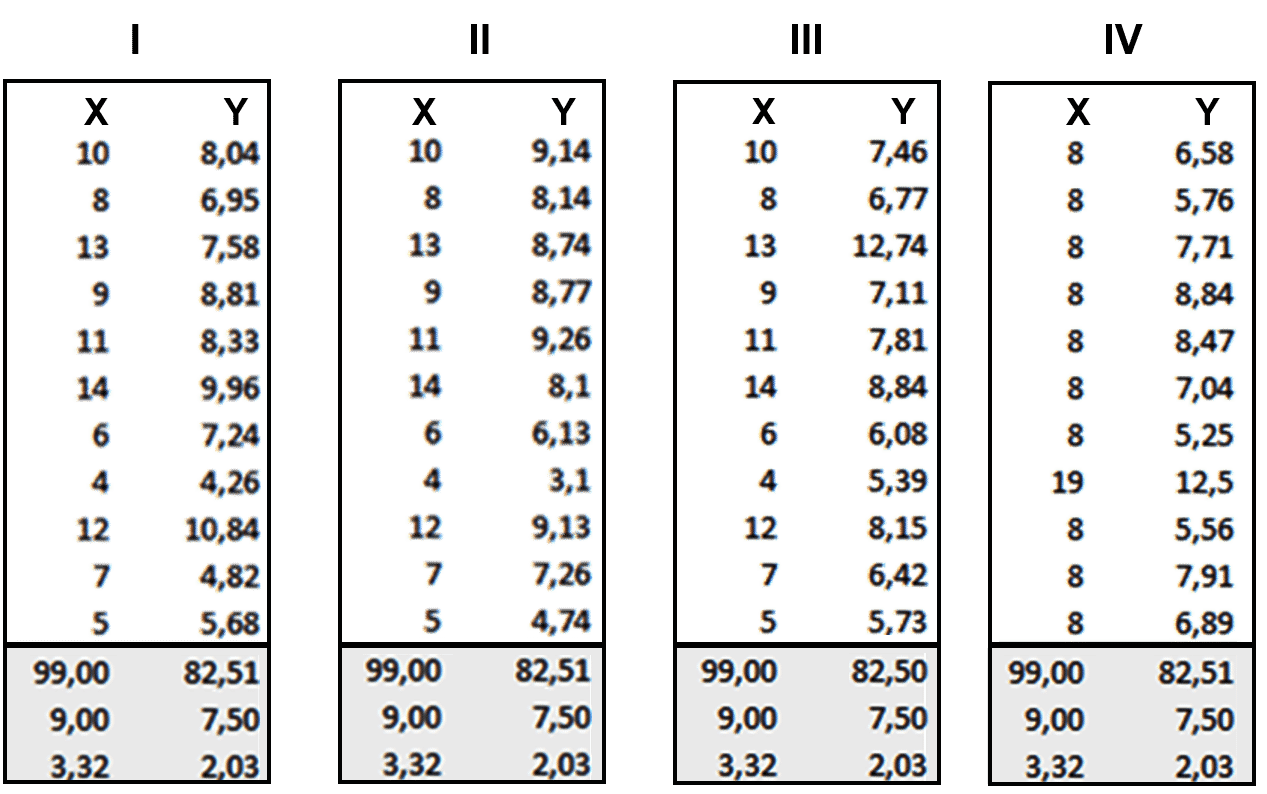
Let us consider the following example to understand this:The following image shows the x and y co-ordinates of different points to be plotted on a graph. The numbers look almost the same, don’t they? Maybe the lines will look similar after we plot each set on the graph.

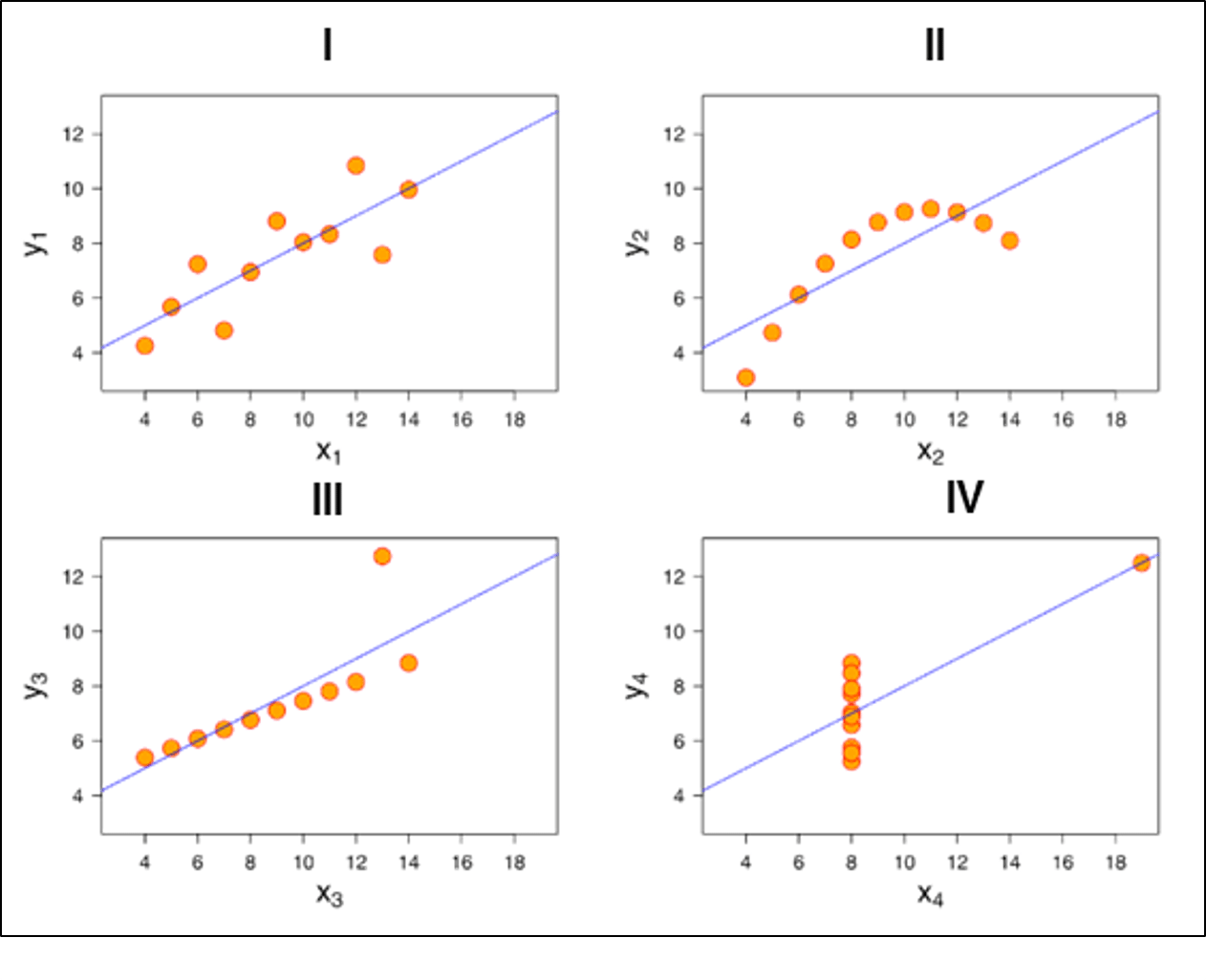
So, now take a look at the image below when we plot these points in our graph:

You see how different they look like when you actually visualize it. It wasn’t possible for us to figure out the nature of each line until we visualized it.

Difference between Excel and Tableau

Both Excel and Tableau are data analysis tools, but each tool has its unique approach to data exploration. However, the analysis in Tableau is more potent than excel.
Excel works with rows and columns in spreadsheets whereas Tableau enables in exploring excel data using its drag and drop feature. Tableau formats the data in Graphs, pictures that are easily understandable.

Parameters
Excel
Tableau
Purpose
Spreadsheet application used for manipulating the data.
Perfect visualization tool used for analysis.
Usage
Most suitable for statistical analysis of structured data.
Most suitable for quick and easy representation of big data which helps in resolving the big data issues.
Performance
Moderate speed with no option to quicken.
Moderate speed with options to optimize and enhance the progress of an operation.
Security
The inbuilt security feature is weak when compared to Tableau. The security update needs to be installed on a regular basis.
Extensive options to secure data without scripting. Security features like row level security and permission are inbuilt.
User Interface
To utilize excel to full potential, macro and visual basic scripting knowledge is required
The tool can be used without any coding knowledge.
Business need
Best for preparing on-off reports with small data
Best while working with big data.
Products
Bundled with MS Office tools
Comes with different versions such as the Tableau server, cloud, and desktop.
Integration
Excel integrates with around 60 applications
Tableaus integrated with over 250 applications
Real time data exploration
When you are working in excel, you need have an idea of where your data takes you to get to know the insights
In Tableaus, you are free to explore data without even knowing the answer that you want. With the in-built features like data blending and drill-down, you will be able to determine the variations and data patterns.
Easy Visualizations
When working in excel, we first manipulate the data that is present and then the visualization such as the different charts, graphs are created manually. To make the visualizations easily understandable, you should understand the features of excel well.
Whereas in Tableau, the data is visualized from the beginning.
To conclude, Tableau beats Excel in major areas like the interactive dashboards, visualizations, capabilities to work with large-scale data and many more.


Reference:

  1. https://www.edureka.co/blog/tableau-tutorial/
  2. https://www.guru99.com/what-is-tableau.html

Stack and Queue as ADT in C++

Stack as ADT The functions associated with stack are: empty()  – Returns whether the stack is empty size()  – Returns the size o...